Ransomware crews don’t just encrypt servers anymore, they go hunting for backups. If they can delete or corrupt your last clean copy, recovery turns into a negotiation.
That’s why S3 Object Lock sits at the center of many 2026 backup designs. It gives you immutability at the object level, so even stolen credentials can’t erase protected backup versions before retention ends.
Below is a practical design that fits regulated environments, supports audits, and still lets operations restore fast when it counts.
A 2026 reference architecture that assumes credentials get stolen
Attack patterns going into 2026 keep pushing toward identity abuse and backup sabotage. Reports also show more data theft first, and more attempts to destroy recovery points. In other words, “we have backups” isn’t a control unless those backups can’t be altered.
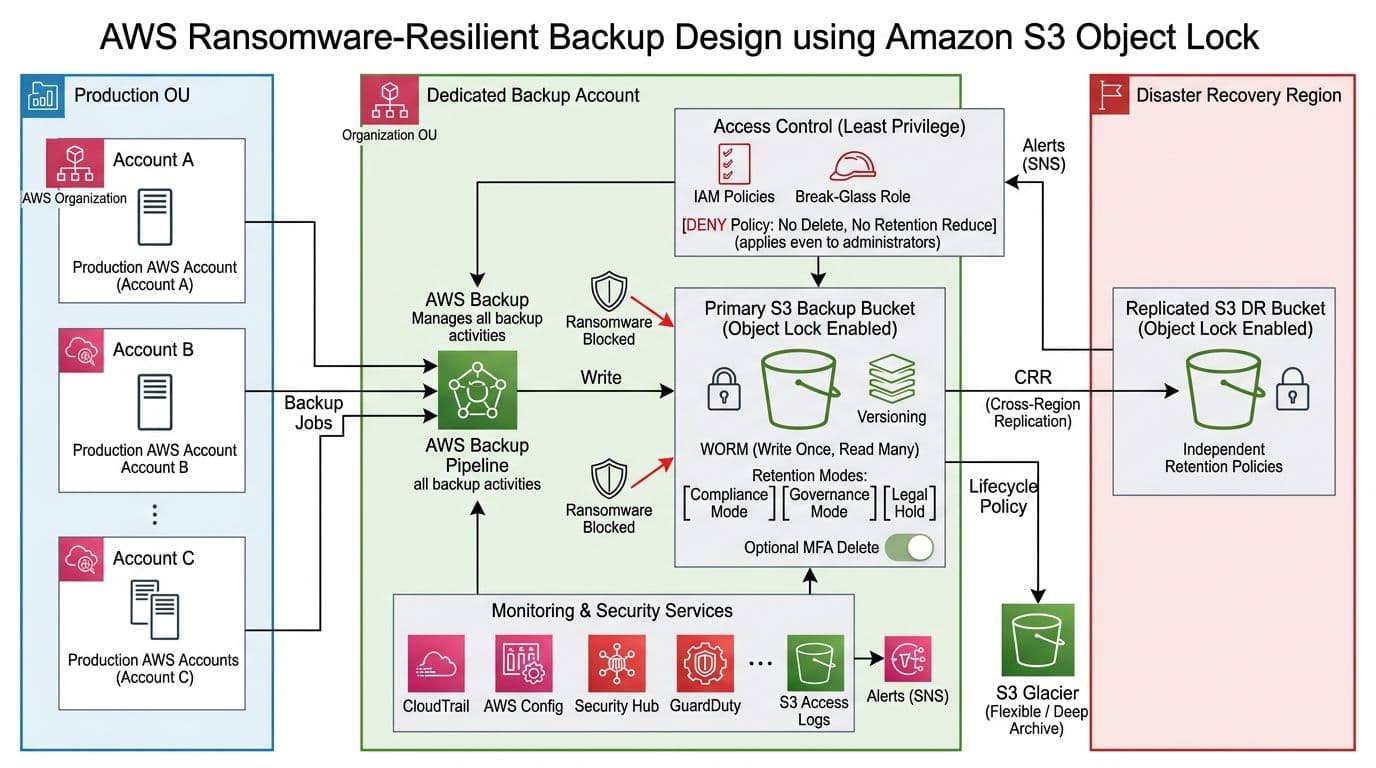
A solid baseline looks like this:
- Production accounts run workloads and generate backups (AWS Backup, database exports, app snapshots).
- A dedicated Backup Account (separate AWS Organizations OU) receives copies. Prod admins should not be able to administer it day to day.
- Backups land in an S3 bucket with Versioning and S3 Object Lock enabled (WORM behavior).
- A second, independent copy goes to a DR-region bucket using S3 Replication, with its own retention.
- You monitor everything, because a silent failure is still a failure (CloudTrail, AWS Config, Security Hub, GuardDuty, S3 access logs, alerting).
AWS has kept the core feature set stable as of March 2026, which is helpful for long-lived compliance designs. For a crisp feature summary, keep the official page handy: Amazon S3 Object Lock overview.
Design rule: assume an attacker can gain admin in prod, then build so that admin still can’t delete backup history.
Bucket configuration you must get right (because some choices don’t undo)
Start with the part teams regret later: immutability settings are intentionally hard to change.
Settings to apply at bucket creation time
In most enterprise builds, you create a fresh bucket and enable Object Lock immediately (many teams treat it as “create-only” for safety and change control). After you enable Object Lock:
- You can’t disable Object Lock on that bucket.
- You should treat Versioning as permanent for that bucket (suspending versioning breaks the whole “version history” recovery story).
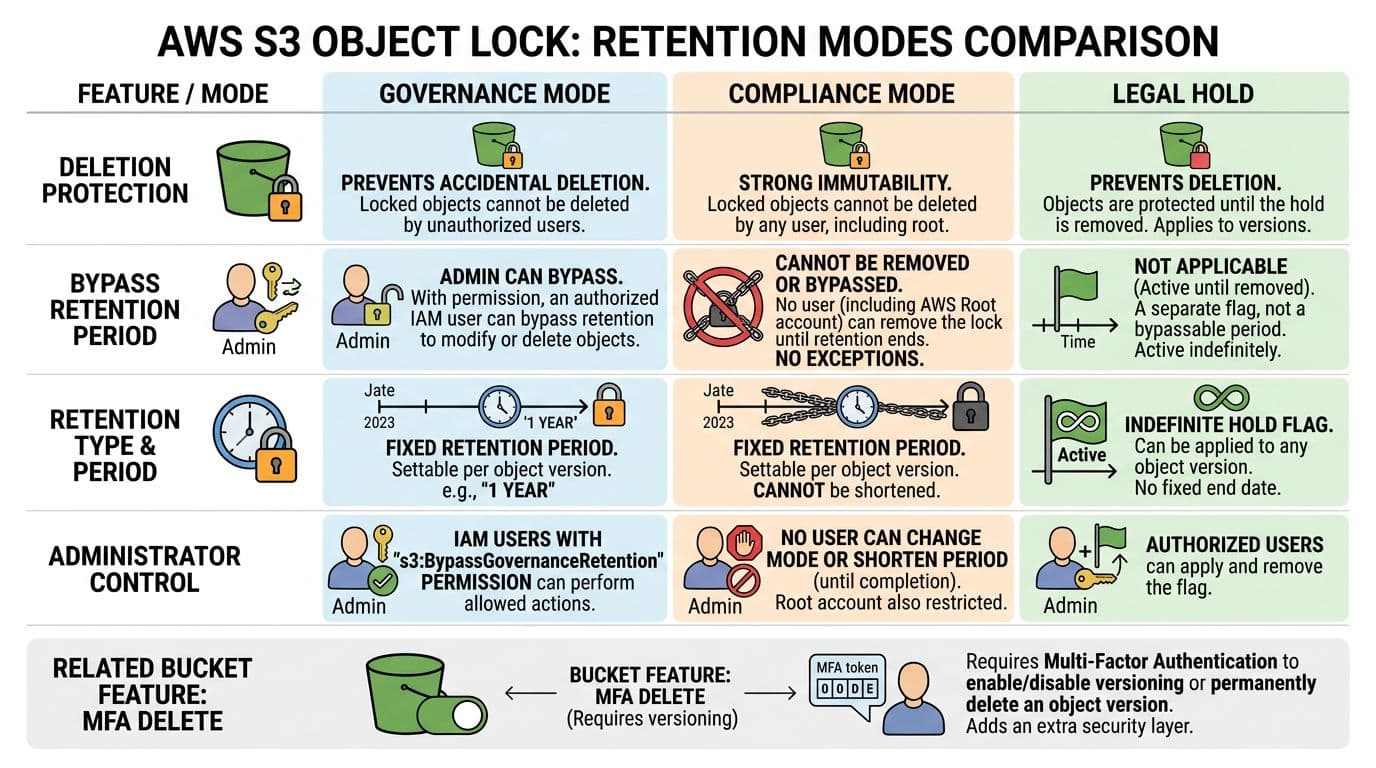
- In Compliance mode, you can’t shorten retention or bypass it, even with the most privileged credentials.
Set these baseline bucket controls:
- S3 Object Lock: Enabled
- Versioning: Enabled
- Default retention (bucket-level) aligned to policy, for example 35 days for operational restores, 90 to 365 days for ransomware recovery, longer for regulated records.
- SSE-KMS with a KMS key owned in the Backup Account (tight key policy, separate admins).
- Block Public Access: On and no public policies, ever.
For a step-by-step walkthrough of Object Lock configuration screens and APIs, reference Configuring S3 Object Lock.
Picking Governance vs Compliance (and where Legal Hold fits)
Use this table to make the decision explicit during risk review:
| Control | Governance mode | Compliance mode | Legal Hold |
|---|---|---|---|
| Who can delete before retention ends? | Only principals with bypass permission | No one | No one (while hold is set) |
| Can retention be reduced? | With special permissions, admins can override | No | Not applicable |
| Best fit | Operational backups with controlled break-glass | Regulated retention, high-assurance ransomware recovery | Investigations, audits, preservation |
A common pattern is Compliance mode for the backup bucket’s default retention, plus Legal Hold for specific incident cases.
Guardrails with IAM and Organizations (example snippets)
Immutability fails if someone can grant themselves bypass or delete rights. You want both IAM boundaries and an SCP.
A minimal deny-by-default SCP concept for the Backup OU:
- Deny
s3:DeleteObjectands3:DeleteObjectVersionon the backup buckets. - Deny
s3:BypassGovernanceRetentioneverywhere (even if you use Compliance, this blocks “just in case” paths). - Deny changes to bucket protections (
s3:PutBucketPolicy,s3:PutBucketObjectLockConfiguration,s3:PutEncryptionConfiguration) except from a break-glass role.
Example deny statement shape (trim to your environment): Effect: "Deny", Action: ["s3:DeleteObject","s3:DeleteObjectVersion","s3:BypassGovernanceRetention"], Resource: ["arn:aws:s3:::YOUR-BACKUP-BUCKET/*"].
Also apply S3 hardening basics. This 2026-focused guide is a good checklist companion: AWS S3 security guide.
Replication and lifecycle that preserve recovery points (and control cost)
S3 Object Lock is strongest when it’s not your only copy. Replicate immutable backups to a second region so a regional outage or account incident doesn’t trap you.
Cross-Region Replication (CRR) notes that matter
- Create the destination DR bucket with Object Lock enabled first.
- Give replication a dedicated IAM role, scoped only to the source prefix and destination bucket.
- Set independent retention on the DR bucket. Don’t assume it mirrors the source defaults.
- Decide how you handle delete markers and replication of metadata, then document it for auditors.
If you need to apply retention to large existing datasets, AWS describes a practical approach using inventory and batch operations in applying S3 Object Lock at scale.
Gotcha: replication won’t “fix” a weak retention choice. If you set short retention on both buckets, you still lose history fast.
Lifecycle tiers that still respect immutability
Lifecycle policies help with cost, but they must not undermine recovery. The good news is that Object Lock blocks expiration until retention ends, even if a lifecycle rule would delete earlier.
A simple tier model:
| Tier | Storage class target | Typical use |
|---|---|---|
| Recent | S3 Standard (or Intelligent-Tiering) | Fast restores, last 7 to 30 days |
| Archive | S3 Glacier Flexible Retrieval | Ransomware recovery window, month-scale |
| Deep archive | S3 Glacier Deep Archive | Long retention, audit history |
Treat lifecycle as a cost control, not a safety control. Keep your safety control in retention settings, SCPs, and restore drills.
Restore testing and proving immutability to auditors
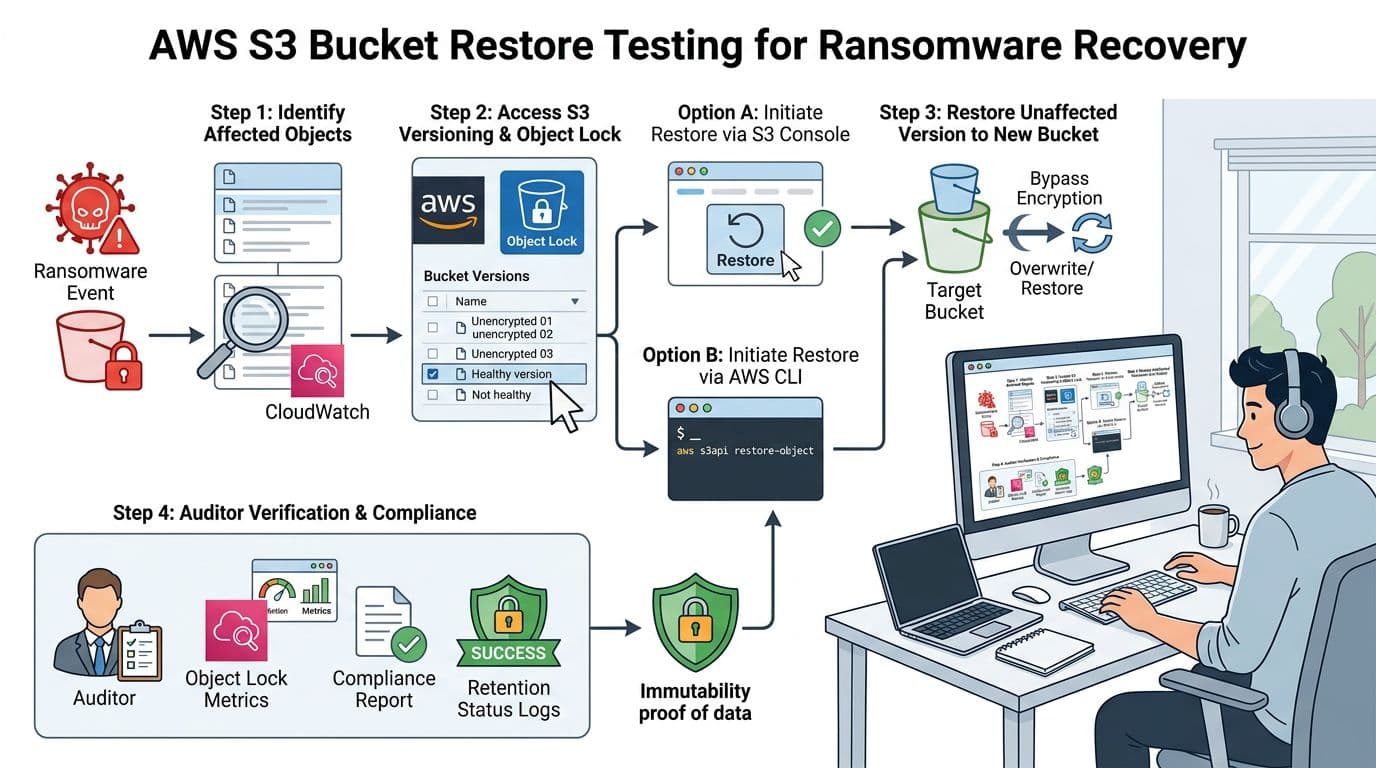
Immutability that no one tests is like a fire door that no one tries to open. Build a repeatable restore drill and capture evidence.
A practical quarterly restore drill
- Select a recovery point (a known-good date) and identify a small but representative dataset.
- Restore to a new “clean room” location, not back to the original bucket or prefix. Keep it isolated from prod roles.
- Validate integrity (hash checks, app-level checks, database consistency, and malware scanning where appropriate).
- Time the process and record RTO and RPO, including human approvals.
Evidence package for audits
Capture proof that objects were immutable and that controls prevented deletion attempts:
- S3 Object Lock configuration (bucket defaults, mode, retention period).
- Object-level retention samples showing
Retain Until Dateand mode. - CloudTrail events showing denied delete attempts (expected in tests).
- AWS Config history for bucket settings drift.
- S3 Inventory reports showing object versions and retention fields at scale.
For deeper object-lock management details you can reference during procedure writing, see Managing Amazon S3 object locks. If you need a plain-language explanation to share with non-AWS stakeholders, this overview is useful: how S3 Object Lock supports immutability.
Implementation checklist for 2026
- Create a dedicated Backup Account in a separate AWS Organizations OU, with limited admin membership.
- Create S3 backup buckets with Object Lock enabled, Versioning enabled, and Block Public Access on.
- Choose retention mode intentionally: Compliance for high assurance, Governance only with strict bypass controls.
- Set bucket default retention aligned to policy, then document exceptions and Legal Hold procedures.
- Encrypt with SSE-KMS using Backup Account owned keys, and restrict key admins and key usage.
- Apply SCP guardrails denying deletes, governance bypass, and bucket security changes outside break-glass.
- Configure CRR to a DR region into a second Object Lock bucket, with independent retention and separate access paths.
- Add lifecycle transitions to Glacier tiers for older backups, and confirm expiration can’t beat retention.
- Turn on monitoring and alerting: CloudTrail, AWS Config rules, Security Hub findings, S3 access logs, and paging for policy changes.
- Run quarterly restore drills to a clean room, record RTO/RPO, and archive the immutability evidence for auditors.

