A virtual desktop budget can look modest until idle session hosts, profile storage, and network traffic start appearing on the Azure bill. Azure Virtual Desktop pricing is easier to control when user access rights and infrastructure are treated as separate decisions, though some organizations may compare these variable costs against a fixed Cloud PC model like Windows 365.
For hybrid workforces, the central question is not the price of one desktop. It is the monthly cost of providing the right capacity to office staff, remote users, contractors, and shift workers without paying for unused compute.
The most reliable estimate starts with access rights, then models session-host usage, virtual desktop infrastructure, storage, networking, and the operating model behind them.
Key Takeaways
- Azure Virtual Desktop has two distinct cost layers, specifically user access rights and Azure infrastructure costs.
- Eligible Microsoft 365 or Windows licenses may cover service access, but they do not cover session host VMs, disks, or bandwidth.
- Compute is usually the largest controllable cost for pooled desktop deployments.
- FSLogix profile container storage, backup, monitoring, and outbound data can materially change a monthly forecast.
- Azure Stack HCI adds a per-vCPU-hour Azure Virtual Desktop service fee, so it needs its own comparison model.
How Azure Virtual Desktop Pricing Works
Microsoft does not generally sell Azure Virtual Desktop as a simple per-user desktop subscription. The platform separates the entitlement to access the service from the Azure resources that run the desktop environment.
The official Azure Virtual Desktop pricing page describes this split clearly. Organizations need user access rights for Azure Virtual Desktop, then pay Azure infrastructure costs for the deployment itself.
That distinction matters during budgeting. A company may already own eligible Microsoft 365 licenses for 2,000 employees. It can therefore have no additional AVD access charge for those users, while still facing a substantial Azure bill for virtual machines, disks, profiles, backups, and egress. Unlike fixed per-user options such as Windows 365 or a Microsoft Cloud PC, AVD separates compute consumption from user licensing in a way that requires careful tracking.

For a normal Azure-hosted deployment, the recurring cost categories are:
- User access rights, where existing eligible licenses or legacy Remote Desktop Services CAL requirements can cover named users.
- Session-host compute, including VM size, operating hours, and the number of hosts kept ready.
- Managed disks and profile storage, including OS disks, Azure Files, Azure NetApp Files, or other approved profile locations.
- Networking, such as internet egress, VPN or ExpressRoute traffic, and related network services.
- Operational services, including Azure Monitor, Log Analytics ingestion, Microsoft Defender, Backup, image management, and third-party management tools.
The control plane itself does not create the same VM-style charge as a session host. Still, supporting services can create a long tail of smaller costs. FinOps teams should track them as part of the desktop service, rather than assigning them to unrelated platform budgets.
Access eligibility can reduce software licensing spend, but it never makes a virtual desktop deployment infrastructure-free.
Hybrid work changes the demand curve. A contact center might need near-full capacity during business hours, while knowledge workers may connect in short bursts across several time zones. A pooled host pool with active autoscaling can reflect that usage pattern. A personal desktop assigned to each user cannot do so as effectively.
Licensing Eligibility and Access Costs
Many enterprises begin with a licensing audit because it changes the economics before any Azure resource is deployed. Eligible licenses can grant an employee access to Azure Virtual Desktop without a separate access charge.
Common qualifying license families include Microsoft 365 E3 and E5 under enterprise licensing, Microsoft 365 Business Premium, and certain Windows Enterprise and Windows VDA per-user licenses. Organizations utilizing active software assurance often find additional pathways for cost management. Education and government licensing have separate eligibility paths. License terms, tenant agreements, user type, and geographic availability all matter, so procurement teams should validate entitlement against their current Microsoft agreement.
The distinction between employees and external users deserves attention. Organizations that provide full desktops or remote app streaming to contractors, partners, or customers may need to use per-user access pricing if those users do not hold qualifying licenses. This can be appropriate for a seasonal workforce, a merger integration, or a controlled partner environment.
Avoid assuming that a Microsoft 365 license covers every scenario. For example, rights for employees under an enterprise agreement do not automatically extend to anonymous users or customer-facing use cases. Likewise, a license that enables access does not include Windows Server Remote Desktop Services client access licenses if the architecture relies on Windows Server session hosts. Administrators can apply the Azure Hybrid Benefit to lower Windows Server license costs for these session hosts.
Windows 11 Enterprise multi-session is a major cost advantage for eligible Azure Virtual Desktop deployments. By leveraging Windows multi-session capabilities, organizations can allow multiple users to share one Windows client operating system VM. That density can reduce compute costs compared with one VM per employee, provided the applications, user profiles, and performance requirements support sharing.
Persistent desktops remain useful for developers, GPU users, regulated roles, and staff with persistent local configurations. Yet they trade flexibility for a more predictable but usually higher cost per assigned user. Finance teams should segment these populations early rather than average them into a single per-seat estimate.
Azure Virtual Desktop Pricing: The Infrastructure Bill
The Azure infrastructure side of Azure Virtual Desktop pricing begins with the session host. VM hourly rates vary by region, series, operating system, Azure offer, and purchasing commitment. A pricing sheet that uses a single global VM rate will fail as soon as deployment regions differ.
Microsoft’s cost-estimation guidance for Azure Virtual Desktop identifies virtual machine instances, managed disk storage, and network bandwidth as primary infrastructure cost categories. These are the minimum lines in a credible business case.
Compute follows capacity, not user count
The user count tells you how many people may connect. It does not tell you how many session host VMs must run. Desktop engineering needs concurrent-user patterns, workload type, application behavior, session limits, and a performance buffer.
For example, 500 licensed employees may produce only 280 simultaneous sessions on a typical weekday. A pooled environment could support that demand with compute capacity distributed across multi-session hosts, plus headroom for login peaks and one host unavailable for maintenance. Proper virtual machine sizing helps manage this, while a personal-host model may require hundreds of running machines even if only half the users sign in that day.
Start with a pilot that measures CPU, memory, disk latency, and application response times. Then choose a conservative initial user density. Office productivity workloads may support considerably more users per host than browser-heavy financial applications, CAD, analytics workloads, or teams with constant video calls.
Consider the purchase model after capacity is understood. Pay-as-you-go pricing offers flexibility, while reserved virtual machine instances can lower the cost of steady baseline capacity. An Azure savings plan may also suit variable usage across eligible compute services. The right choice depends on utilization and commitment risk, not on the largest advertised discount.
Storage is small per user, large at scale
Every session host needs an OS disk, and many designs also include data disks. Those charges are straightforward compared with profile storage, which can grow quickly across a distributed workforce.
FSLogix profile containers preserve user settings and data across pooled desktops, while underlying managed disks and storage costs factor heavily into your budget. Azure Files is a common profile platform, while Azure NetApp Files may fit high-performance or demanding enterprise workloads. Storage capacity, transaction charges, snapshots, redundancy, networking bandwidth, outbound data egress, throughput tier, and backup retention all affect the final monthly number.

Teams often understate storage by counting only profile capacity. A fuller model includes golden image storage, image version retention, application packages, diagnostic logs, backup copies, and disaster-recovery replicas. None of those costs are surprising in isolation. Together, they can invalidate a narrow VM-only forecast.
The following example illustrates the logic, not a guaranteed Azure price.
| Assumption | Illustrative value | Budget effect |
|---|---|---|
| Eligible users | 500 | Access rights may already be included |
| Peak concurrent users | 300 | Sets pooled host capacity |
| Initial host density | 20 users per VM | Requires about 15 active hosts at peak |
| Warm spare capacity | 2 additional hosts | Protects login and maintenance headroom |
| Host operating schedule | 12 hours on weekdays | Autoscaling limits idle compute |
| Profile allocation | 30 GB per user | Guides storage and backup forecast |
Under these assumptions, the initial VM model uses 17 active hosts during peak periods. The monthly total still depends on region, VM family, actual density, disk type, storage transactions, and the autoscale schedule. It should not be presented as a fixed per-user price.
Hybrid Architectures Create Different Cost Profiles
“Hybrid” can mean several things, and each model carries a different bill. Some organizations host all session hosts in Azure while users connect from branch offices through existing corporate networks. Others keep identity services, line-of-business applications, or file servers on-premises. A third group runs Azure Virtual Desktop on Azure Local and Azure Stack HCI.
The first two models still use standard Azure Virtual Desktop consumption for the Azure-hosted session hosts. Their cost question is often network distance. If the desktop runs in an Azure region but the core application remains in a data center, every session may cross the WAN. Latency can damage user experience, while ExpressRoute, VPN gateways, firewall inspection, and egress can add recurring charges. Organizations can often reduce these operating expenses by applying the Azure Hybrid Benefit to lower virtual desktop infrastructure software costs.
Place the session host near the systems it uses most. A workforce close to SaaS applications may be well suited to Azure regions near its users. An application with constant database traffic to an on-premises data center may justify a different placement calculation.
Azure Local and Azure Stack HCI change the model further. They let organizations run Azure Virtual Desktop session hosts on HCI infrastructure in their own data center or edge location. This can help where data locality, low latency, existing hardware, or disconnected operations drive the architecture.
However, Azure Local and Azure Stack HCI are not cost-free AVD. Microsoft applies an Azure Virtual Desktop service fee of $0.01 per vCPU hour in the United States for AVD on Azure Stack HCI, in addition to underlying HCI, hardware, licensing, storage, operations, and connectivity costs. At continuous operation, an 8-vCPU VM would add about $58.40 per month for that fee alone, based on 730 hours.
That rate is a regional reference, not a universal quote. Confirm the applicable region and offer in the current pricing catalog before approval. A local deployment may still make sense, but it needs a full comparison against Azure-hosted compute, including depreciation, power, facilities, hardware support, and staff time.
Build a Defensible Budget Model
A useful model separates fixed baseline capacity from variable workload capacity. It also distinguishes costs the desktop team controls from costs owned by network, security, or identity teams.
Use the Azure Pricing Calculator to create region-specific estimates for VMs, managed disks, Azure Files, bandwidth, VPN Gateway, ExpressRoute, Azure Monitor, and other selected services. You can also utilize the Azure pricing calculator to model how different compute capacity options affect your long-term operational budget. Sign in with the relevant agreement when possible, because public rates may not match enterprise discounts or negotiated pricing.
Build at least three scenarios to support ongoing cost optimization:
- Baseline operations assumes normal concurrency, business-hour host schedules, standard profile growth, and ordinary support services.
- Peak demand adds seasonal workers, merger activity, month-end processing, training events, or regional failover capacity.
- Failure or recovery mode includes the extra capacity and replicated data needed when a region, site, or host pool is unavailable.
Each scenario should state its assumptions. Finance reviewers need to know whether a forecast assumes 10-hour or 24-hour host operation, whether a host pool supports 15 or 25 users per VM, and whether the estimate includes backup, security telemetry, and network services.
For a 24×7 workforce, stopping VMs overnight may have little value. The opportunity then shifts to right-sizing instances, increasing safe user density, evaluating pay-as-you-go pricing against an Azure savings plan for stable capacity, and removing abandoned personal desktops. A daytime knowledge-worker deployment can gain more from autoscale schedules and startup policies.
Chargeback also works better when allocation rules match consumption. A cost per active user can suit pooled desktops. Dedicated desktops may be assigned directly to a business unit. Shared network and security services can be allocated by concurrent sessions, VM hours, or a fixed platform rate.
Reduce Waste Without Reducing User Experience
Auto-scaling is the highest-impact operational control for many pooled deployments. It starts hosts before expected demand, scales out as sessions rise, then scales in when utilization falls. The auto-scaling schedule must account for morning login storms, maintenance windows, and time-zone overlap.
A poorly tuned scaling logic plan can create false savings. If users wait for hosts to start each morning, the business has traded cloud spend for lost time and support tickets. Measure start times and connection failures after each policy change.
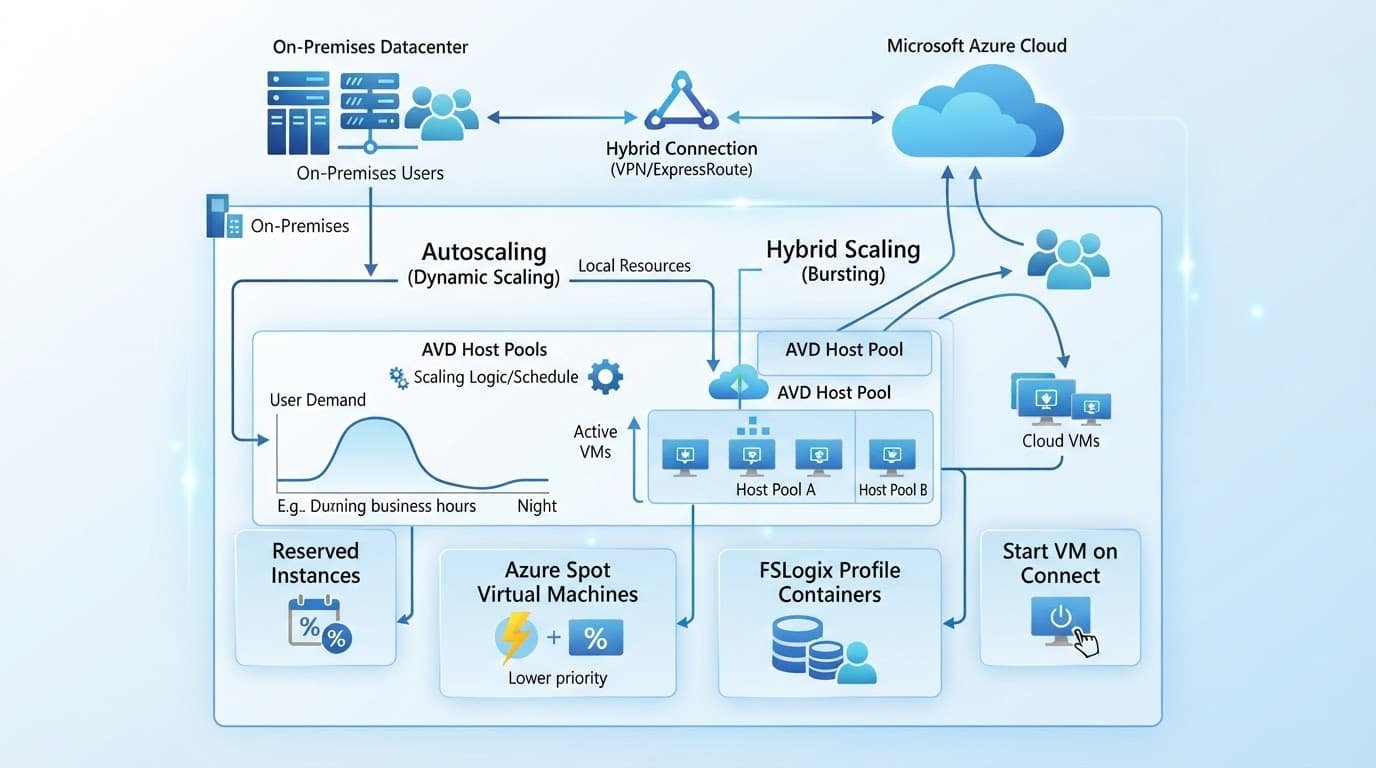
Image discipline is a vital part of ongoing cost optimization. Keep a small, tested catalog of golden images, and retire old image versions according to a defined retention policy. Unused galleries, snapshots, test host pools, and stale profile shares are common sources of avoidable storage costs.
Virtual machine right-sizing should follow telemetry, rather than convention, to support effective cost optimization. A host with persistent CPU pressure may need more cores, but a host with low average CPU can still suffer memory pressure or storage latency. Azure Monitor, Log Analytics, and AVD Insights can reveal those patterns, although their data collection and retention settings add costs of their own.
Organizations weighing AVD vs Windows 365 Cloud PC deployments often use usage telemetry to optimize seat allocations and balance pooled versus personal resources. Review personal desktops separately. A user who has not connected for 60 or 90 days may have changed roles, left the company, or no longer require the assignment. A clean deprovisioning process removes the virtual machine, disks, backups, access, and profile data according to retention policy.
Finally, compare planned capacity with actual sign-ins every month. Usage reports give FinOps teams evidence to revise host density and schedules instead of carrying pilot-era assumptions into production.
Frequently Asked Questions
What are the main cost components of Azure Virtual Desktop?
Azure Virtual Desktop costs are split primarily between user access rights and Azure infrastructure. While qualifying Microsoft licenses may cover the access entitlement, you still pay for session-host compute, managed disks, profile storage, and network bandwidth.
Does a Microsoft 365 license cover everything in AVD?
No. Eligible licenses like Microsoft 365 E3 or Business Premium cover service access rights for eligible users, but they do not cover the underlying Azure virtual machines, storage, backups, or data egress.
How does Windows 11 Enterprise multi-session affect pricing?
Windows multi-session allows multiple users to share a single virtual machine running a client operating system. This high density significantly reduces your compute costs per user compared to a one-to-one personal desktop model.
Can I lower costs by shutting down session hosts when not in use?
Yes. Implementing an active autoscale schedule to turn off pooled session hosts during off-hours is one of the most effective ways to reduce idle compute costs, provided it is tuned to avoid user login delays.
A More Accurate 2026 AVD Budget
A credible Azure Virtual Desktop forecast does not start with a generic cost per user. Instead, it accounts for license eligibility, real concurrency, workload performance, storage behavior, regional placement, and operating hours while leveraging tools like the Azure pricing calculator to simulate various scenarios.
The strongest Azure Virtual Desktop pricing plan also treats hybrid architecture as a financial decision. By factoring in enterprise licensing, Windows multi-session density, and commitments like reserved virtual machine instances or an Azure savings plan, organizations can optimize costs across Azure-hosted pools, connected on-premises systems, and Azure Stack HCI.
When the model records its assumptions and is checked against production telemetry, the desktop service becomes easier to scale without letting idle capacity set the price.

