A good security program assumes endpoints will be lost, probed, or compromised. Microsoft Recall risk changes the math because it can turn normal user activity into a searchable local record. That record may include customer data, internal strategy decks, tickets, chats, and one time codes that briefly appeared on screen.
Recall can also be managed safely in some environments. The difference comes down to policy, device standards, and proof that controls actually work. This guide gives security and IT teams a conservative checklist, concrete mitigations, and a pilot to rollout approach that holds up in audits.
How Recall works in enterprise, and what it means for risk
Recall is designed for Copilot+ PCs. It periodically saves snapshots of what a user sees, then lets the user search those snapshots with natural language. In other words, it’s like a personal “time machine” for work on that device.
From a security view, treat Recall as a local data store that can contain regulated data and security sensitive context. Even when Microsoft keeps processing and storage on device, you still inherit endpoint risks: malware, credential theft, local admin abuse, theft of the laptop, and weak offboarding.
Microsoft’s enterprise control plane is the first decision point. Per Microsoft, managed devices default to Recall being disabled, and users can’t enable it when the policy disallows it. Start with the official admin guidance in Manage Recall for Windows clients, then align it to your internal risk posture.
Identity is the second decision point. Recall access is tied to stronger sign in controls (including Windows Hello and re-auth for viewing). Microsoft also documents user privacy controls and filtering expectations in Privacy and control over your Recall experience. Still, policy beats preferences in regulated environments.
Microsoft Recall risk checklist for enterprise (2026)
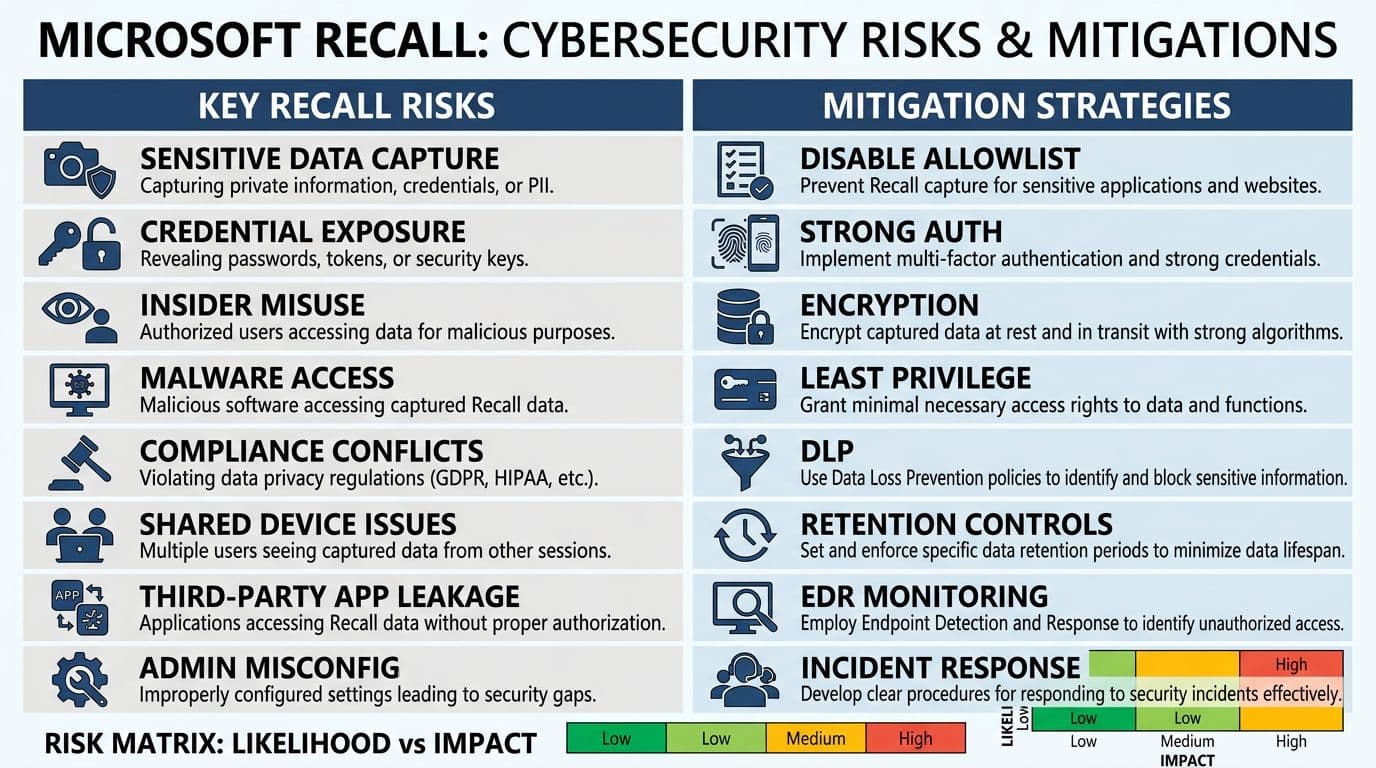
An AI-created infographic summarizing common Recall risks and the matching mitigations for enterprise teams.
Use this checklist as a starting point for your risk register. Severity assumes a typical enterprise with sensitive email, chat, and web apps.
- Sensitive data capture (Severity: High, Likelihood: High)
Snapshots can include PII, PHI, PCI, contracts, and source code. Mitigate with a default deny stance, then allow only for groups with clear use cases and low data sensitivity. Add app and site filtering where supported, and keep “break glass” exceptions rare. - Credential and secret exposure (Severity: High, Likelihood: Medium)
Screens sometimes show passwords, API keys, recovery codes, or admin portals. Reduce likelihood by enforcing passwordless where possible, blocking unsafe browsers and extensions, and requiring secure admin workstations for privileged tasks. - Insider misuse and curiosity searching (Severity: Medium, Likelihood: Medium)
Recall makes it easier to “go back” and find things a user forgot they saw. Constrain access with least privilege, strong sign in, and a clear acceptable use policy that treats Recall content as company records. - Malware or stealer access to Recall data (Severity: High, Likelihood: Medium)
If an attacker lands on the endpoint, local collections become attractive. Require full EDR coverage, tamper protection, and rapid containment playbooks. Pair this with strict local admin controls and removal of legacy tools. - Compliance, retention, and legal hold conflicts (Severity: High, Likelihood: Medium)
Recall creates a new pool of discoverable information, even if it stays local. Set retention expectations up front, document what you can and can’t produce, and ensure Legal and Privacy sign off before any broad enablement. - Shared devices and kiosk scenarios (Severity: High, Likelihood: Medium)
Shared endpoints increase cross-user exposure and complicate proof of presence. Keep Recall disabled on kiosks, labs, call floors with hot seating, and any device with shared local profiles. - VDI and remote access edge cases (Severity: Medium, Likelihood: Low to Medium)
Remote sessions can display sensitive apps that weren’t designed with screenshot capture in mind. Validate behavior in VDI and remote support tools before enabling, and prefer Recall only on single-user, well-managed physical devices. - Third-party app and extension leakage (Severity: Medium, Likelihood: Medium)
Token prompts, customer data in SaaS apps, or chats in non-Microsoft tools can appear in snapshots. Maintain an approved app list, control extensions, and test your highest risk apps during pilot.
Gotcha: even “local only” data can become an incident if the endpoint is compromised or seized. Plan Recall like you plan browser caches and email OST files.
Mitigation guide: policy decisions, technical controls, rollout, and verification
Decide when to disable or allow Recall
Start with a simple rule: disable by default, then allow only for eligible devices and roles. This table helps set clear criteria.
| Decision area | Disable Recall when… | Allow Recall when… |
|---|---|---|
| Data sensitivity | Users handle PCI, PHI, regulated PII, or trade secrets daily | Data exposure is low to moderate and workflows benefit |
| Device model | Shared devices, kiosks, labs, BYOD, VDI endpoints | Single-user corporate Copilot+ PCs with strong baseline |
| Identity | Windows Hello isn’t enforced, weak MFA posture | Windows Hello is required, re-auth is enforced, risk-based access exists |
| Endpoint security | EDR gaps, local admin sprawl, weak patch SLAs | EDR with tamper protection, fast patching, strict admin controls |
| Incident response | No process to contain, wipe, and investigate endpoints | Remote wipe, isolation, and forensic workflow are documented |
For policy mechanics and guardrails, anchor your approach in Microsoft’s admin documentation: Manage Recall for Windows clients.
Local data storage protections and key handling: require BitLocker, a healthy TPM, and protected recovery key escrow. Make sure your endpoint standard blocks credential dumping and restricts debug tools. Treat Recall snapshots like other encrypted local stores, then harden the keys by hardening the device.
Least privilege and identity requirements: keep users out of local admin, limit who can install software, and use separate privileged accounts for admin tasks. Recall’s user re-auth helps, but it doesn’t replace role separation.
DLP and classification: if your DLP program relies on controlling where sensitive data can appear, Recall adds a new “where.” Pilot with your top data types, then decide if certain apps, sites, or roles must stay excluded.
Regulated data handling: for PCI and many PHI workflows, a conservative stance is to keep Recall off. If you consider enabling, require a documented risk acceptance and test that filters and storage controls meet policy.
Retention and eDiscovery: Recall content can affect investigations even without central collection. Microsoft’s consumer oriented behavior description is helpful context in Retrace your steps with Recall. Unknowns still exist by tenant, build, and legal process, so document assumptions and confirm with counsel.
Sample enterprise policy language (short)
Recall is disabled by default on all managed Windows devices. Security may approve Recall only for corporate owned, single-user Copilot+ PCs that meet endpoint baseline controls (BitLocker, EDR, Windows Hello, least privilege). Recall is prohibited for regulated data workflows (PCI, PHI) and on shared devices. Any suspected endpoint compromise requires immediate isolation and remote wipe per incident response procedures.
Pilot to rollout plan that doesn’t surprise Legal or IT
- Pre-pilot alignment: define allowed roles, blocked roles, and regulated data boundaries. Get written approval from Security, Privacy, and Legal.
- Technical baseline: verify BitLocker, EDR tamper protection, patch SLAs, and Windows Hello enforcement.
- Small pilot (2 to 4 weeks): include IT, a low risk business group, and one privacy representative. Capture user value and security findings.
- Control validation: test offboarding, remote wipe, incident containment, and DLP expectations.
- Phased rollout: expand by department only after controls pass and exceptions are documented.
For additional practical hardening ideas, compare notes with independent guidance like Protecting Your Enterprise Against Microsoft Recall, then reconcile differences against your own controls and Microsoft’s docs.
Validation and testing: prove Recall is disabled or enabled
Verification should be repeatable and audit-friendly.
- Policy verification: confirm the Recall policy state in your management platform, then spot-check devices to ensure users can’t flip it on locally when disallowed.
- Functional verification: on allowed devices, confirm Recall requires Windows Hello and re-auth before viewing snapshots.
- Artifact awareness: validate where snapshots live and how they’re protected on your current Windows build. Storage paths and implementation details can change, so re-test after feature updates.
- Incident drills: run a tabletop where a Copilot+ PC is stolen, then confirm remote wipe, account disablement, and investigation steps close the loop.
Conclusion
Recall can be useful, but it also creates a high value local record of user activity. The safest enterprise stance in 2026 is simple: keep it off unless you can prove device eligibility, identity strength, storage protection, and incident response readiness. When you do allow it, roll out slowly, test like an auditor, and document every exception. If your team can’t explain your Microsoft Recall risk posture in two minutes, it’s time to tighten the plan.

