If you run vSphere today, 2026 probably feels like a deadline. Licensing changes, bundle pressure, and hardware refresh cycles tend to collide at the worst time. The result is familiar: leadership wants options, and ops teams want a plan that won’t break production.
A solid Proxmox migration plan is less about “copy VMs over” and more about rebuilding the operating model: clusters, storage, networking, backups, access controls, and change control. This guide lays out a practical path for VMware administrators who want fewer surprises and clearer rollback points.
Set the target architecture, not just the hypervisor
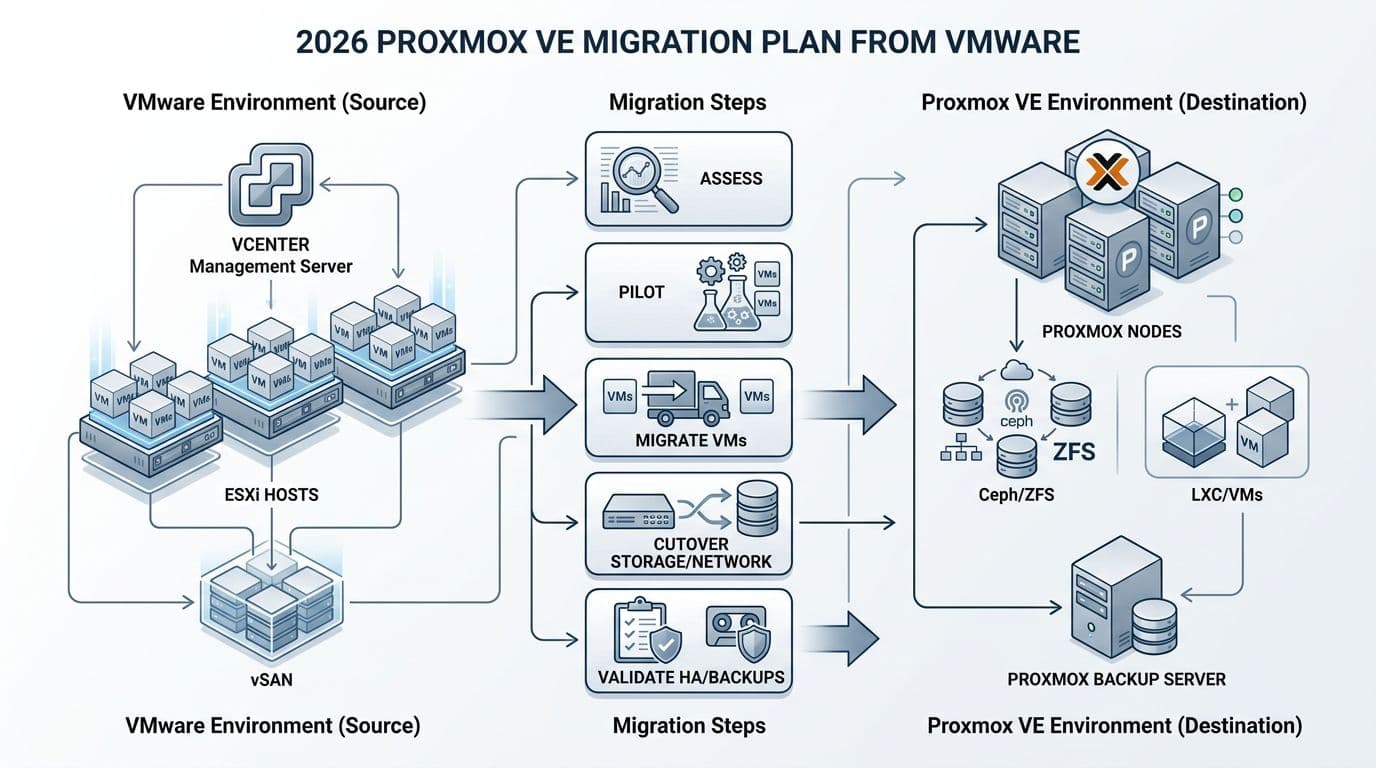
Start by writing down what “done” means in your environment. For most VMware shops, that includes HA behavior, patching cadence, backup RPO/RTO, and day-2 tasks like VM provisioning and network changes.
In 2026, teams also care more about security basics that used to be assumed: audit trails, least privilege, MFA coverage, and consistent backup immutability. Proxmox VE can meet those needs, but you must design for them up front, especially around identity, role design, and storage layout.
Use this simple mapping to align teams during planning workshops. It reduces talking past each other, which saves time in approval meetings.
| VMware concept | Proxmox VE concept | Practical note for migration |
|---|---|---|
| ESXi host | Proxmox VE node (Linux) | Plan host hardening and Linux patching ownership. |
| vCenter | Proxmox web UI + API | Decide who owns cluster-wide changes and auth sources. |
| Cluster | Cluster (corosync) | Size quorum correctly, plan split-brain handling. |
| vSphere HA | Proxmox HA | Define restart priority, fencing expectations, and test cases. |
| DRS | No direct equivalent | Use sizing, VM affinity rules, or external automation. |
| VMFS datastore | ZFS, LVM, NFS, Ceph | Choose per workload, not one size for everything. |
| vSAN | Ceph | Validate network design first, Ceph hates weak networking. |
| vMotion | Live migration | Confirm shared storage or migration network capacity. |
| Port groups | Linux bridges, VLANs, SDN | Document VLAN intent and trunking on ToR switches. |
| vSphere snapshots | Snapshots | Set policy, long-lived snapshots still cause pain. |
For feature comparisons while you decide scope, see this Proxmox vs. VMware comparison. Also, verify current vendor documentation before you lock in assumptions, because subscriptions, support tiers, and feature packaging can change.
Migration succeeds when your storage and network designs are boring. “Creative” designs show up later as 2 a.m. incidents.
Pre-migration checklist (the work that keeps cutover boring)
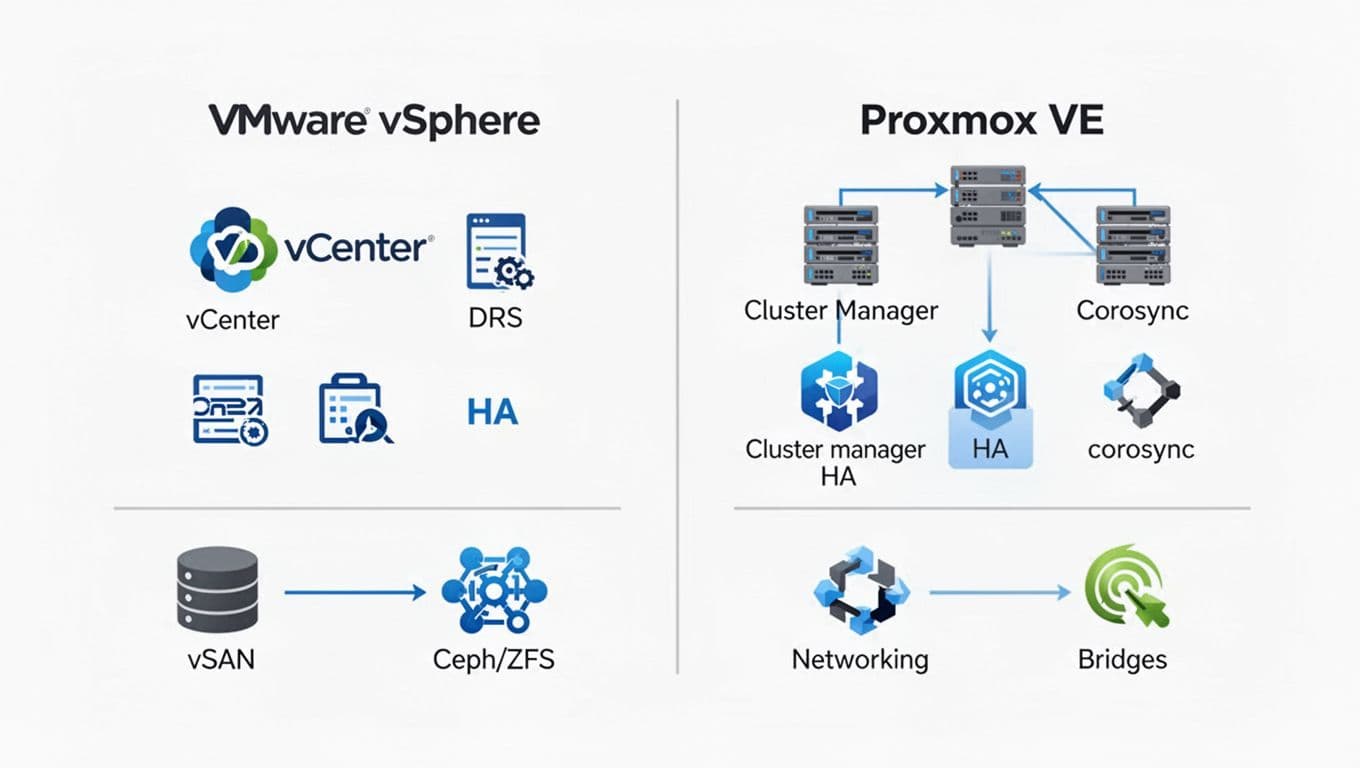
Most failed migrations aren’t caused by the import tool. They come from hidden dependencies: an old VM hardware version, a vendor appliance with strict NIC drivers, or a backup product that can’t cover the new stack on day one.
Use this checklist to force discovery early, while you still have time to change direction.
- Inventory and grouping: Export a VM list with owners, SLAs, OS versions, IPs, VLANs, storage type, and special devices (USB dongles, PCI passthrough, GPUs).
- Compatibility flags: Identify UEFI vs BIOS, Secure Boot needs, and any Windows workloads that depend on TPM. Plan how you’ll handle vTPM in the new environment and test snapshots and restores.
- Networking reality check: Document VLAN trunking, MTU, routing, and firewall rules. Confirm how you’ll map port groups to bridges and how you’ll handle “shared services” networks (DNS, NTP, AD).
- Storage decision: Pick where each workload lands (local ZFS, shared NFS/SAN, or Ceph). Then set performance targets (IOPS, latency) and measure current baselines.
- Backups and retention: Define RPO, retention, immutability, and restore testing. Decide whether Proxmox Backup Server is in scope on day one.
- Ops and compliance: Update change management templates, create break-glass access, and define RBAC roles. Turn on audit logging where available, forward logs to your SIEM, and schedule access reviews.
- Runbook and training: Assign on-call ownership, escalation paths, and a short “how we do it now” guide for common tasks.
For a strategic view that blends technical and operational planning, this VMware to Proxmox guide is a useful cross-check.
A wave-based cutover template that doesn’t rely on heroics
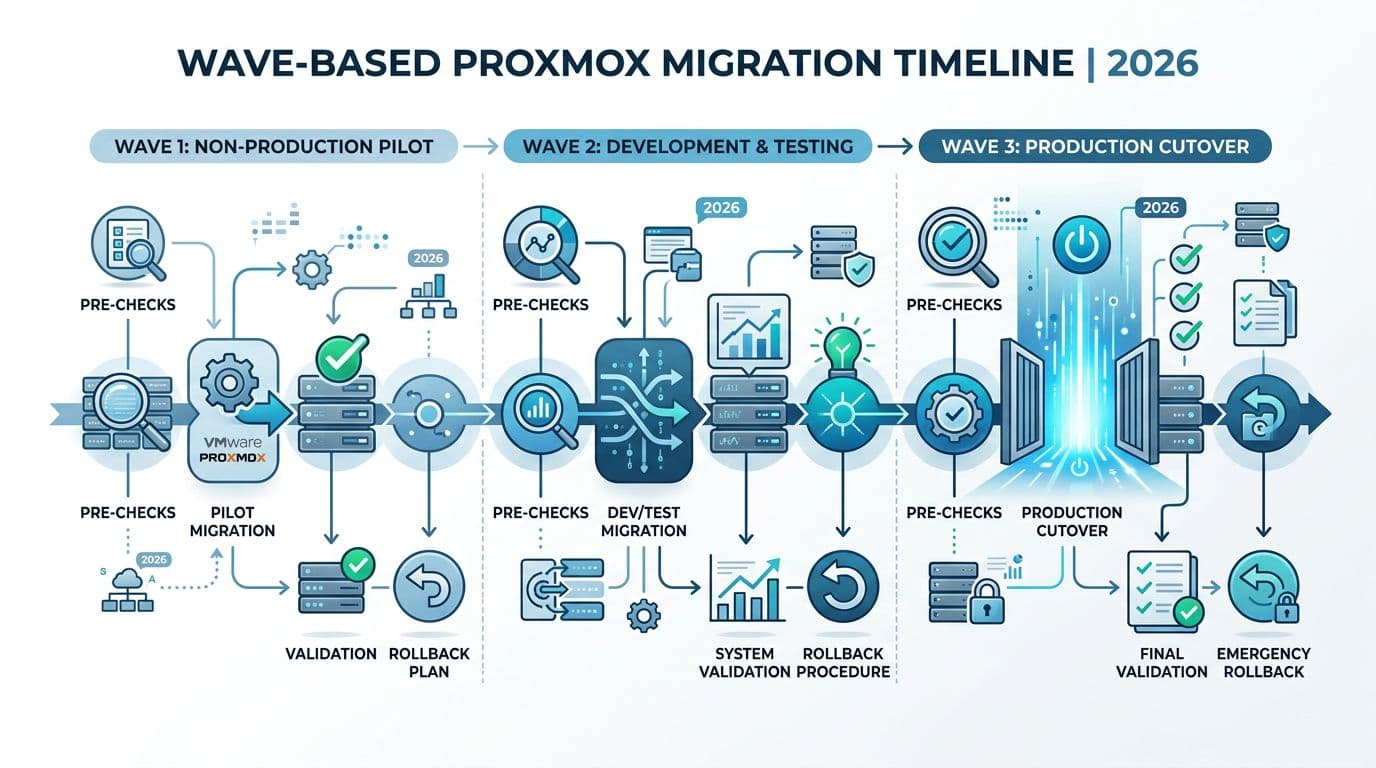
Treat migration like moving a data center rack: label everything, move in small batches, and keep a clear path back. Your waves should reflect risk, not org charts.
Below is a template you can copy into a change plan. Keep each wave small enough to roll back inside the approved window.
| Wave | Workloads | Migration method | Planned downtime | Rollback trigger | Success criteria |
|---|---|---|---|---|---|
| 0 (lab) | Tooling, test VMs | Import and rebuild | 0 to 30 min | Any blocker | Repeatable runbook and metrics baselines. |
| 1 (non-prod) | Dev, QA, jump hosts | Import/restore | 30 to 60 min | App owner sign-off fails | Monitoring and backups work end-to-end. |
| 2 (low-risk prod) | Stateless apps, web tiers | Import with short outage | 30 to 120 min | Perf regression or auth failures | Stable for 7 days, no Sev-1 incidents. |
| 3 (core prod) | DBs, ERP, auth deps | Rebuild or staged migration | Planned window | Missed RTO/RPO | HA tested, restore tested, DR plan updated. |
During each wave, follow the same tight sequence: freeze changes, take verified backups, migrate a small set, validate, then expand. That repetition is the point.
If you need a step-by-step look at common VMware to Proxmox VM migration mechanics (import wizard vs manual conversion), this ESXi to Proxmox VE migration walkthrough can help you compare approaches.
Risks, mitigations, and post-migration validation (first 30 days)
A Proxmox migration plan isn’t complete until it includes failure. Write down what you’ll do when something goes wrong, because it will.
Here’s a risk table that maps well to change approvals and audit discussions.
| Risk | How it shows up | Mitigation | Test to prove it |
|---|---|---|---|
| Performance regression | Higher latency, CPU ready-like symptoms | Baseline before migration, right-size vCPU, verify storage queueing | A/B benchmark on one migrated workload. |
| Network mis-mapping | VMs boot but can’t reach services | Pre-map VLANs, document bridges, validate MTU end-to-end | Ping, throughput, and app synthetic checks. |
| Backup gap | Backups run but restores fail | Restore testing policy, PBS sizing, immutable retention review | File-level and full VM restore tests. |
| HA surprises | HA doesn’t restart what you expect | Define HA groups and priorities, test fencing assumptions | Kill a node during a maintenance window. |
| Access control drift | Too many admins, weak separation | RBAC roles, MFA, log forwarding, quarterly access reviews | Audit log review and privileged access check. |
After each wave, run validation that covers operations, not just “VM boots”:
- Performance: Compare CPU, memory, disk latency, and network throughput to pre-move baselines.
- HA failover: Trigger a controlled node failure and confirm restart order and time-to-service.
- Backups: Confirm schedule, retention, and at least one successful restore per app tier.
- Monitoring and alerting: Validate host, VM, storage, and backup alerts, then route them to the right on-call queue.
- Security and compliance: Confirm admin roles, audit logging, and change tickets for any firewall or VLAN edits.
If you can’t restore it and you can’t explain who changed it, you haven’t finished migrating it.
Conclusion
VMware exits in 2026 succeed when teams treat the move as an operating model change, not a one-time copy job. A careful Proxmox migration plan starts with architecture choices, then proves them through small waves, tight rollback rules, and repeatable validation. Keep compliance in the room from day one, because access controls and audit logs aren’t “later” work anymore. Before you lock timelines, re-check current vendor docs and support terms, since product and licensing details can change.

