One weak policy can leave dozens of AWS accounts exposed. One bad deny can also stop deployments across your production estate.
That is why an AWS SCP audit has to go past JSON review. You need to validate inheritance, account placement, exceptions, and the odd cases that appear after fast growth or an acquisition. As of April 2026, AWS SCPs support the full IAM policy language, so older review methods miss useful checks.
Start with the organization tree, because every later finding depends on where a policy actually applies.
Audit the organization tree before you read a single policy
SCPs work through AWS Organizations, not through individual principals. A deny at the root affects every child OU and member account below it. If an account sits in the wrong OU, it gets the wrong guardrails on day one.
Scope matters during review. SCPs limit member accounts, including their root users, but they do not restrict the management account. They also do not control service-linked roles in the usual way. The AWS SCP documentation is the best place to confirm current behavior before sign-off.
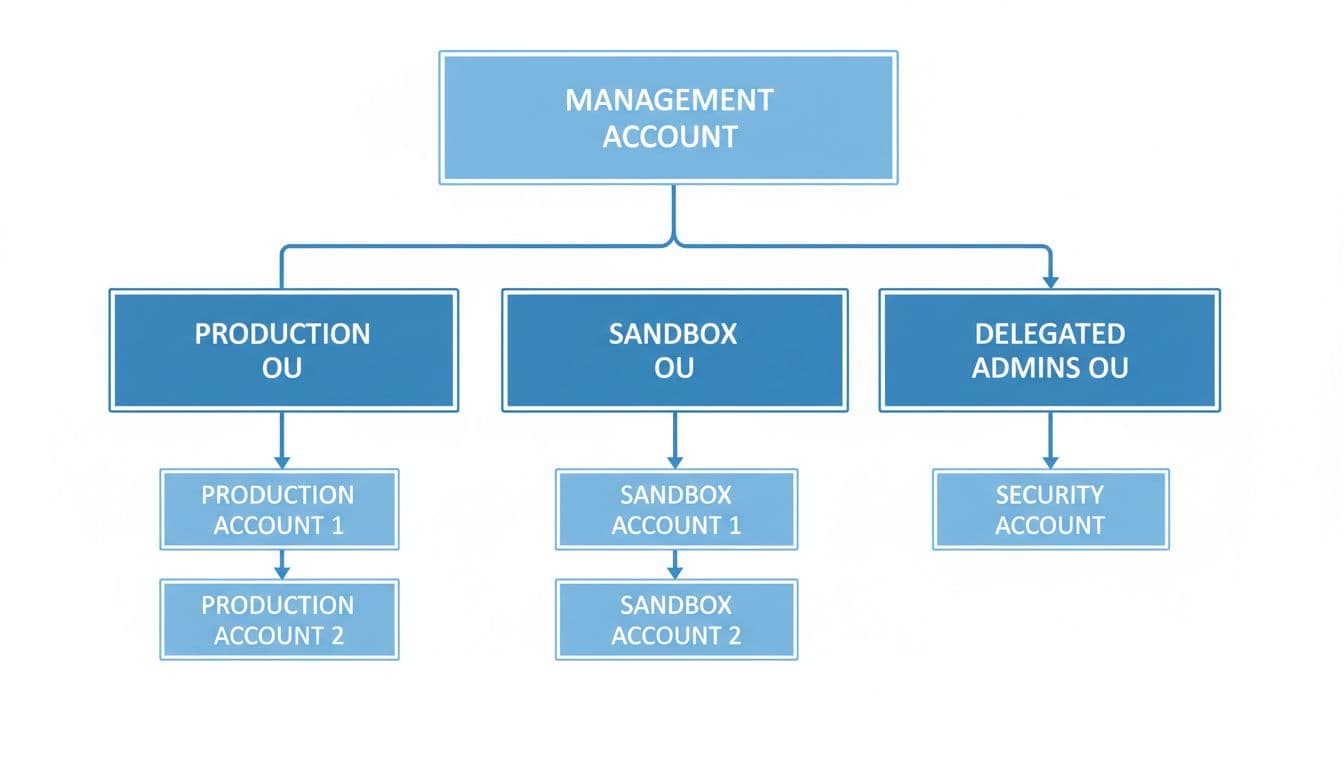
For a real audit, map the root, every OU, delegated admin accounts, and every direct account attachment. Then compare that map to your intended control model. Production, sandbox, shared services, log archive, and security accounts should rarely share the same SCP set.
Use this quick checkpoint table during the review:
| Verify | Why it matters | How to validate |
|---|---|---|
| Root and OU attachments | Inheritance drives effective access | Export attachments and compare them to the OU map |
| FullAWSAccess status | It shows deny-list vs allow-list design | Confirm where it stays attached or is removed |
| New and acquired accounts | They often miss baseline guardrails | Match join dates to first SCP attachment dates |
| Direct account-level exceptions | They hide drift from OU standards | Review tickets, owners, and expiry dates |
The takeaway is simple: policy content means little if the attachment path is wrong.
Separate SCPs from IAM, permission boundaries, and resource policies
Many audit failures start with one basic mix-up. Teams read an SCP as if it grants access. It doesn’t. An SCP is a ceiling. IAM identity policies grant permissions to users and roles. Permission boundaries cap what a principal can receive through IAM. Resource-based policies grant access on the resource itself, often across accounts.
AWS explains the interaction well in this re:Post article on IAM and SCP behavior. During review, trace the full chain: root, OU, account, SCP, IAM policy, permission boundary, then resource policy.
An IAM allow never overrides an SCP deny. If the SCP blocks it, the request stops there.
This distinction matters more in 2026 because SCPs are no longer limited to the old, simpler patterns. Since late 2025, they support the full IAM policy language for SCP syntax, including conditions, resource ARNs, NotResource, and richer allow patterns. That is good news for region controls, tag-based limits, and tighter guardrails around high-risk actions. It also means auditors must read SCPs with the same care they apply to IAM policies.
Validate the operating model next. If the organization uses a deny-list approach, confirm that the denied actions are high-risk and still current. If it uses an allow-list approach, confirm that every required service is covered and tested. A missing allow in production feels like a circuit breaker no one meant to flip.
Also review service last accessed data and policy test results. AWS recommends both in its SCP guidance. This helps you remove dead permissions and catch policy changes before rollout. Older checklists that only search for Deny statements are now too shallow.
Check OU guardrails, exceptions, and edge cases people forget
A good multi-account design uses different guardrails for different OUs. Production OUs usually need tighter region limits, stronger logging protections, and blocks on actions like leaving the organization or disabling core security services. Sandbox OUs can be looser, but they still need cost, region, and org-escape controls. If you want a comparison point, these OU-specific SCP examples show how teams separate production, development, and security guardrails.
Account-vending and M&A work create the most common audit gaps. New accounts should land in a bootstrap or quarantine OU until baseline SCPs, logging, and required roles are in place. Acquired accounts need the same path. If the account enters production before those controls attach, there was a window with weak governance.
Exception management needs the same level of scrutiny. Every exception should have a business reason, named owner, ticket reference, expiry date, and removal plan. An exception with no expiry is usually permanent drift.

Common red flags appear fast during review:
- Production and sandbox inherit the same SCP set.
- New or acquired accounts bypass the bootstrap OU.
- FullAWSAccess is removed by accident, or left attached where an allow-list was intended.
- Exceptions have no owner, ticket, or expiry.
- SCPs block logging, security tooling, or incident response roles.
AWS keeps adding organization-level controls and adjacent policy types, so verify current service support and feature behavior before you close the audit. Static templates age badly.
What a solid AWS SCP audit leaves behind
A strong review does more than find bad policy statements. It confirms scope, inheritance, operating model, and exception hygiene across the full organization.
The best audits also reduce both risk and outage chances. If one missing SCP can open a door, one misplaced SCP can break a whole OU. That is why the cleanest result is a policy set that matches the org chart, the account lifecycle, and the way teams really work.

