More CPU sockets and more GPUs don’t fix a memory bottleneck if capacity sits in the wrong server. That’s the problem CXL memory pooling tries to solve.
For enterprise teams, the appeal is clear: share memory across hosts, raise utilization, and stop buying DRAM for peak cases that appear a few times a month. Still, as of April 2026, most deployments remain pilots or narrow production builds, so the buying decision needs care.
What CXL memory pooling actually means
Compute Express Link (CXL) is a high-speed interconnect built on PCI Express. It lets processors, accelerators, and memory devices exchange data with better coherence than a basic PCIe device model.
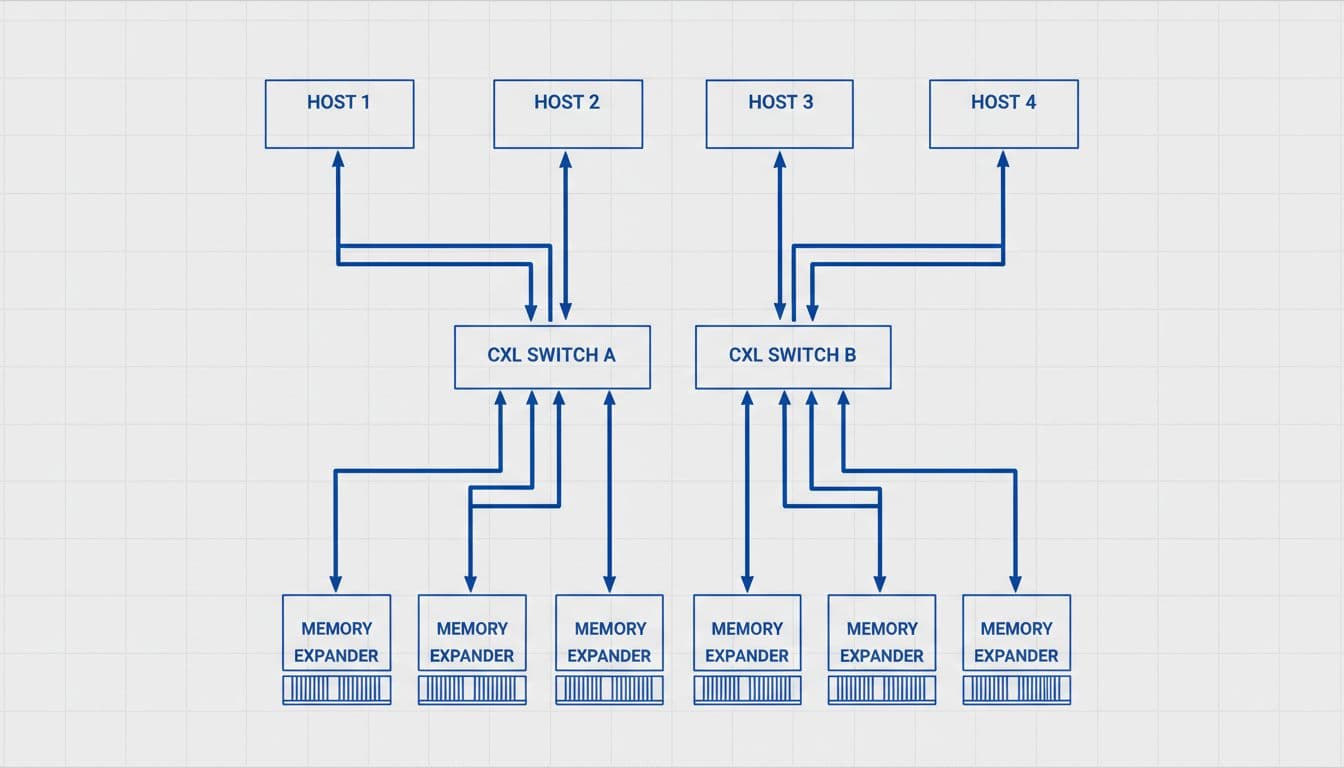
In simple terms, CXL memory pooling moves some DRAM out of individual servers and into a shared layer. Servers then reach that pool through CXL switches and memory devices. Think of it as a shared reservoir instead of a private well in every chassis.
That differs from memory expansion. Expansion adds more memory to one host. Pooling lets multiple hosts draw from a common resource. For infrastructure teams, that difference drives the whole business case.
The protocol pieces that matter
You don’t need the full spec to evaluate a platform. Three protocol layers matter most. CXL.io handles device discovery, setup, and control. CXL.cache supports cache coherence between host and device. CXL.mem lets the host access attached memory as memory, which is the key piece behind most expansion and pooling designs.
Still, not every CXL-capable system can pool memory. Some platforms support only basic attachment or one-host expansion. Others need new firmware, BIOS settings, switch silicon, and operating system support before pooling works in a stable way.
Also, pooled memory isn’t the same as local DRAM. It is usually slower and more dependent on the fabric path. That means teams should treat it as a shared memory tier, not as a free upgrade to every workload.
The market is moving, but it is still early. Most enterprise activity sits in labs, proof-of-concept racks, or targeted AI builds. Public moves, such as Marvell’s rack-level CXL switch announcement, show vendor momentum. They do not mean broad, low-risk rollout across standard data center fleets yet.
Where CXL memory pooling helps, and where it doesn’t
Why do teams care? Because memory is expensive, and much of it sits idle. One node in a virtualization cluster may carry unused DIMMs while another hits a ceiling. AI servers often run into a memory wall before compute is fully used. In-memory databases may need rare bursts that force oversized hosts.
CXL memory pooling can improve utilization because you size a rack for aggregate demand, not worst-case demand per node. As a result, teams may cut overprovisioning, reduce stranded capacity, and plan growth in larger, more flexible chunks. In dense rows, that can also change rack design. Instead of maxing every server with DIMMs, you can place memory devices behind switches and grow shared capacity when needed.
This quick comparison shows where the model usually fits best.
| Workload type | Likely fit | Why |
|---|---|---|
| AI inference and some training stages | Strong | Large models and key-value caches can outgrow local memory |
| Virtualization clusters | Moderate | Bursty VM density benefits from shared headroom |
| In-memory databases | Selective | Capacity needs help, but latency must be tested |
| Low-latency OLTP and NUMA-sensitive apps | Weak | Local DRAM still wins for predictable response time |
The takeaway is simple: pooled memory works best when capacity pressure is the first problem, not raw latency.
Treat pooled memory as a shared memory tier, not as a drop-in replacement for local DRAM.
That is why high-density AI and cloud infrastructure get much of the early attention. A detailed CXL 3.2 pooled memory cost model for AI training helps show why operators want more flexible memory placement, even when local accelerator memory stays in place.
What enterprise teams must verify before procurement
Start with compatibility. A server marked “CXL-ready” may support only memory expansion, not true shared pooling. Check CPU generation, switch support, memory device support, BIOS and firmware levels, kernel or hypervisor support, and each vendor’s support matrix. If one layer falls short, the feature set shrinks fast.
Next, look at orchestration. Shared memory needs policy, not hope. Your scheduler or fabric manager must track ownership, quotas, failover behavior, and path loss. That matters in virtualization clusters, bare-metal AI pools, in-memory data platforms, and private cloud designs.

Observability matters just as much. Teams need telemetry for link health, latency, bandwidth, pool utilization, hot spots, and error rates. Without that, you can’t tell whether an application is hitting CPU pressure, fabric congestion, or a noisy neighbor draining shared capacity. Clear alarms and clear failure domains matter more here than with fixed local DIMMs.
Procurement timing also matters. In 2026, CXL memory pooling fits best for teams with a real memory bottleneck now, often in AI or high-density compute. If you’re planning a broad server refresh for standard enterprise apps, waiting may save pain. CXL 3.x fabrics are maturing, while larger multi-rack designs tied to later standards remain planning items, as many long-range CXL 4.0 infrastructure guides make clear. Buy for a pilot when you can measure a real gain. Don’t buy for a roadmap slide.
More DRAM per server is the old answer to a shared capacity problem. CXL memory pooling offers a better answer in the right rack, with higher utilization, cleaner growth, and less stranded memory.
The catch is fit and timing. If your workloads can trade some local-memory speed for flexible capacity, run a pilot and demand exact compatibility proof from each vendor. If they can’t, stay with local DRAM and revisit CXL on the next platform cycle.

